Stop Paying the Support CRM Tax: Why Support Leaders are Moving to a CRM-Less Architecture in 2026
Read More


A practical guide for Support Engineering and CX leaders navigating CRM transitions — covering data integrity, continuity of AI insights, cost management, and how SupportLogic’s architecture uniquely de-risks the entire journey.
By Noppol Setobol
Solutions Engineer, SupportLogicSupport CRM migrations are among the most consequential infrastructure decisions an enterprise can make. Driven by M&A activity, digital transformation mandates, cost pressures, or the pursuit of AI-native capabilities, migrations are becoming more frequent — and more complex.
In 2025, the dominant drivers pushing enterprises toward CRM modernization include: AI-powered support features that older platforms can’t offer, organizational consolidation after mergers, a desire to unify support and sales data under a single platform like Salesforce Service Cloud, and the imperative to meet tighter SLA and escalation management standards.
“Nearly 70% of data migration projects go over time, blow their budgets, or fail completely — yet the pressure to modernize has never been greater.”
The platforms typically involved in enterprise support migrations include Salesforce Service Cloud, Zendesk, ServiceNow, Microsoft Dynamics 365, and Freshdesk. Each migration pattern carries its own complexity — but they all share a common problem: risk of losing institutional support knowledge.
Every CRM migration carries a risk spectrum. For support organizations specifically, the following seven represent the highest-impact failure modes, ranked by their combined probability and downstream cost.
| Risk | Without Mitigation | Mitigation Strategy | SupportLogic Role |
|---|---|---|---|
| Data loss / corruption | Critical | Pre-migration audit, phased validation, backup checkpoints | Handles data migration between instances as part of onboarding |
| Field mapping failures | High | Visual field mapping review; sandbox testing with real data samples | CRM-agnostic schema; signals persist across CRM boundaries |
| AI model continuity | High | Ensure signal extraction carries over; avoid model cold-start | Models persist independently of the underlying CRM |
| Stakeholder resistance | High | RACI matrix; early demos; phased rollout per team | Embeddable iFrames make the new CRM familiar from day one |
| Integration breakage | High | Integration inventory; webhook re-mapping pre-cutover | Lightweight connectors re-point to new CRM without rework |
| Compliance gaps | Medium–High | Data lineage documentation; legal review of data residency | SOC 2 certified; GDPR/CCPA compliant; secure data isolation |
| SLA degradation | Medium | Hypercare period; dedicated migration tiger team | Real-time escalation prediction continues uninterrupted |
Drawing from industry data and enterprise migration patterns, the following practices consistently determine whether a migration strengthens support operations or temporarily — and sometimes permanently — damages them.
Before touching a single record, inventory your current CRM thoroughly. Identify duplicates, null fields, schema inconsistencies, and deprecated custom objects. Target a minimum 95% data quality threshold before proceeding. A Gartner 2024 report found 55% of companies face data quality failures during migrations — most of which originate in pre-existing data debt.
Map every source field to its destination counterpart — including custom objects, case relationships, contact associations, and sentiment or tag fields. Use a visual mapping tool and involve both IT and support operations representatives. Field mapping errors are the #1 source of post-migration manual rework.
Before committing to a full migration, execute a representative pilot on a 5–10% sample that mirrors your actual data complexity — including messy, edge-case records. Evaluate data accuracy, system performance, and workflow functionality. Resolve at least 80% of identified issues before scaling.
Migrate user groups or data categories gradually rather than executing a single big-bang cutover. Each phase stabilizes before the next begins. This reduces the blast radius of any single failure and allows teams to course-correct iteratively.
For support organizations, historical case data isn’t just a record — it’s the training substrate for predictive AI models. Ensure that case history, sentiment signals, escalation flags, and customer interaction data carry over to the new system in a queryable, model-accessible format.
65% of failed migrations stem from insufficient stakeholder engagement. Define clear ownership across IT, Support Operations, Finance, Legal, and Customer Success. Weekly touchpoints during migration prevent ambiguity from becoming a blocker.
Test all third-party integrations — Slack, Gainsight, Jira, knowledge bases, telephony systems — in a sandboxed staging environment before cutover. Broken integrations are often discovered only in production, where the cost of discovery is highest.
Create complete backups before each migration phase checkpoint, not just before the initial migration. Data corruption can occur at any step. Incomplete backups have cost organizations weeks of recovery work and tens of thousands in emergency restoration costs.
Allocate dedicated technical resources for a structured 4–6 week hypercare window after go-live. This period is when the majority of unforeseen issues surface. Monitor escalation rates, SLA compliance, and agent throughput closely as leading indicators of migration health.
This is the strategic game-changer. If your AI insights, escalation predictions, and sentiment analysis are tightly coupled to a single CRM, every migration restarts your intelligence from zero. By deploying a CRM-agnostic intelligence layer like SupportLogic, your AI capabilities survive — and continue running — throughout the transition.
SupportLogic is the leader in Support Experience (SX) management, delivering a Cognitive AI Cloud purpose-built for enterprise customer service. Its architecture is fundamentally different from CRM-native AI — and that difference is precisely what makes it uniquely valuable during migrations.
“SupportLogic is a non-intrusive, cloud-based layer of intelligence for your existing CRM environment. There’s no ‘rip and replace’ or deep coding required.”
Rather than building intelligence into a specific CRM, SupportLogic deploys as a lightweight connector that sits above your CRM stack. This architecture means that when you change the CRM underneath, the intelligence layer continues operating — with full historical context intact. The SupportLogic platform ingests unstructured signals from tickets, chat, voice, and email, then uses AI to detect urgency, sentiment, product issues, and revenue risk in real time, regardless of which CRM surfaces the underlying cases.
SupportLogic’s lightweight data connector requires no deep CRM coding and no workflow reconstruction. It layers intelligence over your existing environment — meaning migration of the underlying CRM doesn’t disrupt the AI layer.
As part of the onboarding process, SupportLogic handles the data migration between your CRM instances. The platform manages the connection and ensures signal continuity from day one on the new system.
Escalation prediction, sentiment models, and case routing logic are maintained within SupportLogic’s own model layer — not inside the CRM. Switching CRMs does not reset your AI training or signal history.
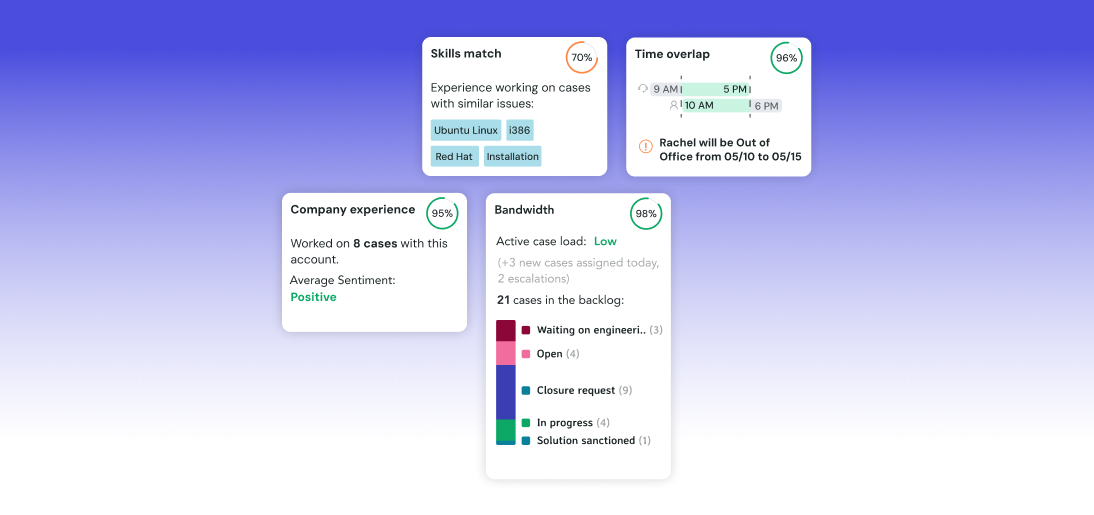
The SupportLogic CRM Widgets surface AI insights directly inside the new CRM as embeddable iFrames. Agents get the same GenAI summaries, sentiment insights, and escalation predictions — in any supported CRM.
Escalation prediction and proactive alerts continue operating throughout the migration window. At-risk accounts aren’t left unmonitored during the transition period when customer vulnerability is highest.
SOC 2 certified, GDPR and CCPA compliant, with secure data isolation. SupportLogic’s compliance posture doesn’t add regulatory risk to your migration — it reduces it.
One of the most powerful aspects of SupportLogic in the context of CRM migration is its breadth of native integration support. The platform integrates with every major enterprise support CRM, meaning its value doesn’t diminish as organizations evolve their CRM stack.
Supported CRM platforms via native connectors include:
The SupportLogic Data Integration Guide details how each connector is configured. Critically, the same lightweight widget framework that deploys into Salesforce also deploys into ServiceNow, Zendesk, and Dynamics — meaning agents’ workflows are consistent even when the CRM underneath changes.
Beyond CRM integrations, SupportLogic connects to the broader enterprise stack — including Slack, Microsoft Teams, Gainsight, Intercom, Snowflake, and internal knowledge bases. These integrations survive CRM migrations intact, since they connect to SupportLogic rather than to the CRM directly.
SupportLogic brings real-time sentiment, contextual knowledge, and intelligent response automation directly into your CRM — closing the gap between what your CRM shows and what your team actually needs. The widgets run natively within your CRM interface, requiring no separate dashboard or tab.
Explore CRM Widgets →The following framework maps SupportLogic’s specific capabilities to each phase of a typical enterprise support CRM migration. This phase model can be adapted for any CRM-to-CRM transition pattern.
During the assessment phase, SupportLogic’s existing signal extraction baseline becomes a benchmarking asset. Current escalation rates, sentiment trends, case routing accuracy, and agent performance scores are documented as the “before” state. This data-driven baseline makes the business case for the migration concrete and measurable, and establishes the KPIs that will define post-migration success.
SupportLogic’s connector is configured to point to the new CRM staging environment in parallel with the existing one. This dual-connection capability means sentiment signals and escalation predictions can be validated against the new data pipeline before any production cutover. Issues with field mapping in the new CRM are surfaced by SupportLogic’s signal processing — not by customer escalations.
As agents and case queues migrate to the new CRM in waves, SupportLogic’s Agent Assist capability provides continuity via embeddable iFrames. Agents on the new CRM see the same SupportLogic insights they relied on in the old environment — with no re-onboarding required from the SupportLogic side. Write-back capabilities to both CRMs can be configured simultaneously during transition.
Post-cutover, SupportLogic’s dashboards become the primary monitoring layer for migration health. Escalation prediction accuracy, case backlog trends, and sentiment signal volumes are tracked against the pre-migration baseline. Anomalies — indicating data quality issues or routing gaps — surface in SupportLogic before they materialize as customer escalations.
The financial case for deploying SupportLogic before, during, and after a CRM migration is compelling across several dimensions. Organizations that use SupportLogic as their intelligence continuity layer during migrations consistently report lower total migration cost and faster time-to-value on the new CRM platform.
Enterprise escalations are expensive — typically $15,000–$75,000+ in direct and indirect costs per incident. SupportLogic’s real-time escalation prediction, which continues operating throughout migration, prevents the increase in escalation rate that typically characterizes CRM transition periods. For organizations averaging 2–3 escalation incidents per quarter, avoiding even one additional escalation during migration pays for the SupportLogic deployment many times over.
When enterprises build AI models natively within their CRM (e.g., via Salesforce Einstein or ServiceNow Now Assist), those models must be retrained from scratch on the new CRM’s data format. This cold-start period typically spans 60–120 days, during which prediction accuracy is materially lower. Because SupportLogic’s models are CRM-agnostic and maintained externally, they transfer instantly — eliminating the cold-start risk entirely.
SupportLogic’s managed data migration process significantly reduces the manual engineering effort required to validate and reconcile case data after cutover. Organizations that have attempted to build this reconciliation logic in-house report 80–240 hours of engineering time spent on post-migration data cleanup. SupportLogic’s structured migration handling eliminates the majority of this cost.
Because SupportLogic’s CRM Widgets surface the same GenAI summaries, sentiment insights, and prioritization signals across any supported CRM, agents experience no productivity cliff tied to learning a new AI toolset. The Agent Experience — case summaries, My Cases prioritization, grammar assist, translation, and tonality tools — is consistent before and after the CRM change.
Global enterprises like Salesforce, Informatica, CyberArk, Snowflake, and Databricks trust SupportLogic to prevent escalations, reduce costs, and elevate CX. See how it applies to your migration use case.
Request a Demo →Use this checklist to assess your organization’s readiness before initiating a support CRM migration. Each item represents a category where incomplete preparation creates measurable risk.
The most durable lesson from enterprise support CRM migrations is architectural: intelligence should not be trapped inside infrastructure. When AI capabilities are built natively into a CRM, they become liabilities at migration time — requiring full retraining, re-integration, and re-validation on the new platform.
SupportLogic’s approach — deploying as a CRM-agnostic intelligence layer that connects to any major support platform — transforms CRM migrations from high-risk disruptions into manageable infrastructure upgrades. The AI models that predict escalations, the sentiment signals that surface at-risk accounts, the agent productivity tools that drive CSAT — all of these continue operating, uninterrupted, while the CRM underneath changes.
For CX and Support leaders planning a migration in 2025–2026, the sequence is clear: deploy SupportLogic before migration to baseline your intelligence, run the migration underneath without disruption, and emerge on the new CRM platform with your full AI capability intact — and a roadmap to extend it further.
“The best migration is one your customers never notice. SupportLogic makes that possible.”
Want the latest B2B Support, AI and ML blogs delivered straight to your inbox?