5 Ways Customer Success Can Use Support Data to Reduce Customer Churn
Read More


Ryan Radcliff
Director of Product Marketing, SupportLogicEvery support engineer knows the feeling: You open your CRM and see a wall of cases, each with the same “Open” or “In Progress” status, but no clear signal about which ones are truly critical. One customer may be minutes away from escalating, while another could be quietly frustrated, and a third might be waiting on the same fix you solved last week.
The problem is not your CRM, it’s that your CRM was built to manage tasks instead of understanding conversations. To get real answers, you jump between Jira tickets, documentation portals, Slack threads, and old cases to piece together the full picture. Each switch adds delay and friction, taking focus away from resolving customer issues quickly and completely.
Modern support teams need more than “workflow automation.” They need insight at the point of action. They need to see what is happening, why it is happening, and what to do next, all inside the CRM.
CRMs have made huge strides in automation. Tools like Einstein, AgentForce, and Now Assist can summarize activity, surface quick replies, and power chatbots that handle common tasks. These are real improvements for speed and efficiency.
But for enterprise support teams, that automation is not enough. The reality is that enterprise cases are long, complex, and full of context that generative CRM AI cannot see. A customer may open a case in English, continue in Japanese, reference a Jira issue, and share logs from three product versions. Within that mix are signals of frustration, urgency, and risk that standard CRM AI models are not designed to interpret.
CRMs are built for breadth, not depth. They serve retailers, manufacturers, and B2C brands as easily as they serve enterprise software providers. That broad design makes them versatile but shallow when it comes to understanding technical support interactions. Enterprise teams need AI that can read the conversation, track intent across systems, and guide human agents toward the next best action in real time.
SupportLogic CRM Case Widgets fill that gap. They give your CRM a deeper layer of intelligence built specifically for enterprise post-sales teams.
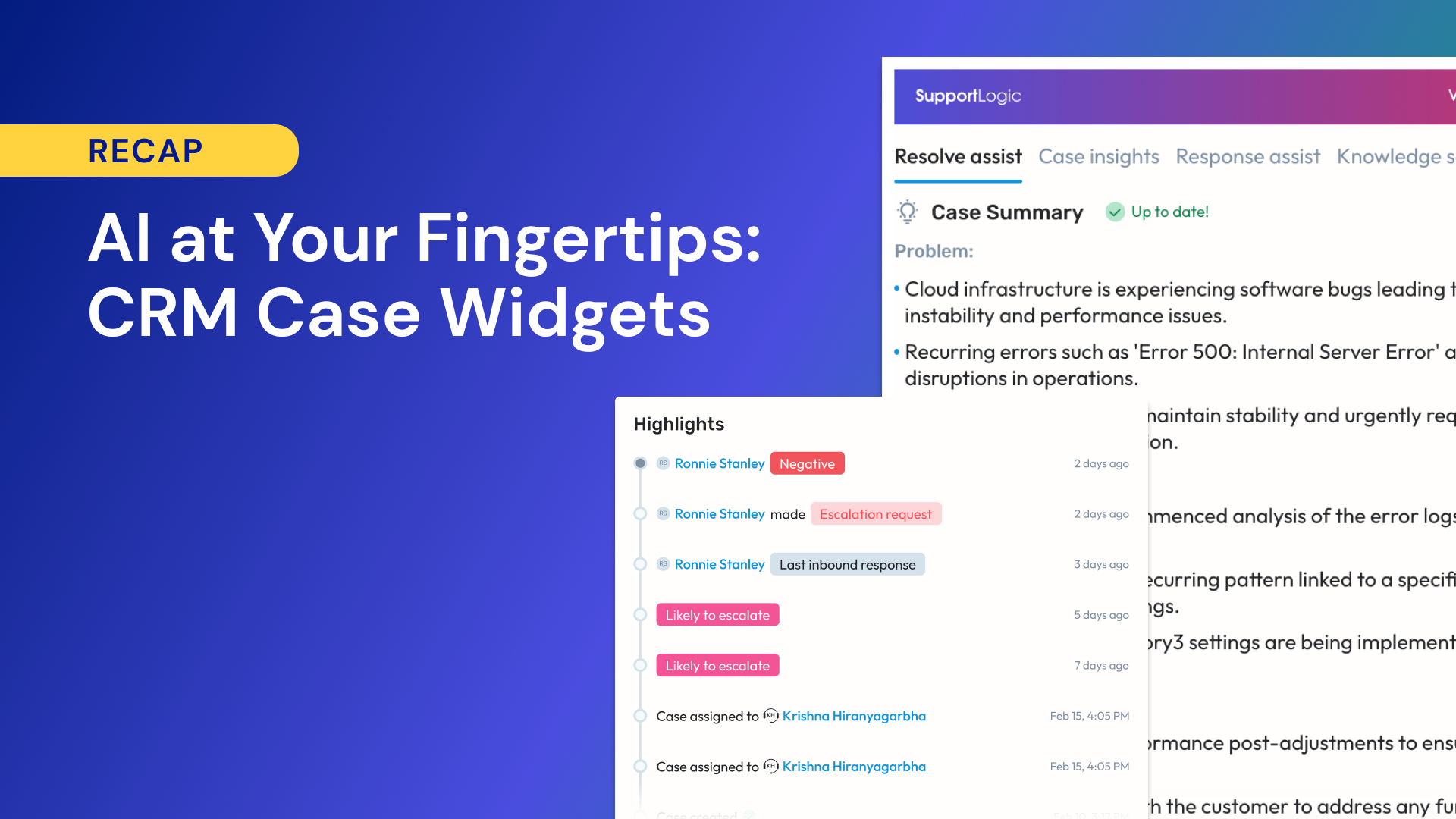
SupportLogic CRM Case Widgets bring the power of contextual AI directly into your CRM workspace. They connect to Salesforce, ServiceNow, Zendesk, and Freshdesk (and more), giving your team real-time understanding and action without leaving the case view.
Each widget acts like a lens into the customer conversation. Instead of scrolling through pages of notes, comments, and attachments, agents see a complete view of the case the moment it opens. Summaries, key signals, and next-step recommendations appear automatically, allowing support engineers and managers to focus on what truly matters: solving the issue.
These widgets are built for enterprise support, not generic ticket handling. They use SupportLogic’s Cognitive AI Cloud of Agentic AI and Precision RAG technology to understand every customer interaction, surface knowledge from connected systems, and provide guided assistance at each step.
Each Case Widget is designed to make support work faster, more accurate, and more informed. Together, they transform the CRM from a place where cases are tracked into a place where issues are understood and resolved.
When a case opens, agents instantly see a short, AI-generated summary that includes the problem, current status, and recommended next action. Alongside it appears a knowledge summary that surfaces the most relevant documentation, past tickets, and articles from connected systems such as Jira, ServiceNow, or internal wikis. Use cases:
This tab analyzes every case interaction to reveal the emotional and operational health of a customer issue. The Sentiment Score captures how the customer feels across 40 emotional signals, while the Attention Score shows how much urgency is building in the case. A timeline view displays these signals chronologically so teams can understand not only what happened, but when and why it happened. Use cases:
Response Assist uses all available context, the case summary, knowledge, and sentiment, to generate a complete draft response. Agents can adjust tone (empathetic, professional, technical, concise, or friendly) and translate responses into more than 30 languages. Grammar and clarity optimization are built in to ensure every message is consistent and on brand. Use cases:
This tab provides plain-language search across all connected knowledge sources using Precision RAG technology. Agents can type natural-language questions and instantly receive relevant, cited answers from documentation, tickets, and data sources across the enterprise. Use cases:
Together, these four tabs remove the friction of context switching and make the CRM the single source of truth for case resolution.
Enterprise support involves more than agents managing tickets. It is a coordinated effort among engineers, managers, customer success leaders, and executives, each with different goals and pain points. SupportLogic CRM Case Widgets bring clarity and speed to everyone involved.
They live in the queue, solving complex cases under pressure. They need context fast. With CRM Case Widgets, engineers see a complete picture of each case the moment it opens. They can act on accurate summaries, recommended next steps, and related knowledge without switching tools or searching multiple systems.
They balance quality, speed, and mentorship. They also need visibility across the team. Sentiment and Attention Scores help prioritize which cases need intervention first. The case timeline view provides insight into where conversations turn critical, helping lead agents and prevent repeat issues.
They own customer relationships and prepare for renewals or QBRs. They need fast insights without digging through cases. The summary and sentiment view allow account leaders to scan multiple cases per account and get a quick read on overall customer health, risk, and progress.
They’re still learning product knowledge, tone, and workflow. They need examples and guidance. Response Assist and knowledge summaries give new agents strong starting points for replies and direct access to relevant past cases. Ramp time shortens, and consistency improves.
They’re responsible for customer experience, visibility, and response quality. Case summaries and sentiment insights provide instant situational awareness before escalation calls. Executives gain confidence knowing their teams are supported by data-driven context rather than anecdotal updates.
They deliver support across regions and languages. Response Assist provides tone control and translation to more than 30 languages, ensuring clear, professional, and empathetic communication across borders.
Across every role, CRM Case Widgets deliver the same outcome: faster resolutions, better communication, and fewer blind spots.
CRM platforms have introduced their own AI features. Tools like Einstein, AgentForce, and Now Assist automate routine actions such as summarizing cases, predicting outcomes, and recommending macros. These are valuable features, but they stop short of true understanding.
SupportLogic CRM Case Widgets go beyond automation to deliver real intelligence. They analyze every customer interaction across voice, chat, and email to interpret meaning, emotion, and urgency. The result is a complete, context-rich view of what is happening and why.
Where CRM AI identifies sentiment as positive or negative, SupportLogic detects over 40 distinct signals, including frustration, confusion, urgency, renewal intent, and feature requests. This allows teams to prioritize based on actual customer emotion, not just ticket volume.
Standard CRM search tools rely on keywords and can miss critical nuances. SupportLogic uses Precision RAG to retrieve the most accurate, trustworthy information from all connected sources, complete with citations. The right knowledge surfaces automatically when a case opens, eliminating the need for manual search.
SupportLogic not only reads the conversation but also guides the next best step. With real-time sentiment and attention data, teams can act before an issue escalates or a renewal is lost.
CRMs are built for a wide range of customers, from small retailers to global brands. SupportLogic focuses exclusively on enterprise support environments, where cases are complex, technical, and multi-system by nature.
Together, these capabilities create an AI layer that enhances the CRM rather than replaces it. Your CRM continues to be the system of record, while SupportLogic turns it into a system of understanding and action.
Enterprise support teams that use SupportLogic CRM Case Widgets are seeing measurable improvements in how fast they work, how accurately they respond, and how customers feel throughout the process.
When the right context, knowledge, and suggested actions appear instantly, teams spend less time searching and more time solving. At CyberArk, SupportLogic helped increase the number of cases closed within three iterations by 11%. Cases now reach resolution faster, with fewer handoffs and less back-and-forth between teams.
The combination of sentiment signals and attention scoring allows teams to act before customers escalate. By identifying early signs of frustration or stagnation, managers can intervene and prevent minor issues from becoming critical. Customers like Salesforce and NiCE have reported significant reductions (up to 56%) in both escalations and unassigned case queues.
Agents save valuable time by generating draft responses directly within their CRM. Tone presets and translations make it easier for global teams to communicate clearly and consistently. New hires reach full productivity in weeks instead of months.
With real-time insight into how customers are feeling and what they need, teams respond with empathy and precision. Organizations using SupportLogic report stronger customer satisfaction scores, better renewal rates, and higher trust in their post-sales experience.
SupportLogic CRM Case Widgets deliver outcomes that CRM-native AI tools alone cannot match. They bring context, empathy, and action into the place where every customer conversation already happens.
SupportLogic CRM Case Widgets are powered by the Cognitive AI Cloud, a platform built to analyze customer interactions across every support channel. It continuously ingests data from CRM systems, ticketing tools, chat logs, and knowledge bases, transforming raw text into structured signals, insights, and recommended actions.
Each message, note, and comment is analyzed using natural language processing to identify emotion, intent, and behavior. The system detects over 40 unique sentiment signals such as frustration, urgency, and renewal intent, giving support teams visibility into how customers truly feel throughout a case.
The Context Engine connects data from multiple systems (CRM, Jira, documentation portals, and internal databases) to maintain long-term memory across interactions. This ensures that every summary, score, and response reflects the full customer history, not just a single case.
Precision Retrieval-Augmented Generation delivers reliable knowledge retrieval that goes far beyond keyword search. When a case opens or a user submits a query, the system scans all connected sources, filters results for relevance and accuracy, and generates cited, plain-language answers within the CRM.
The generative layer combines contextual data, knowledge, and sentiment signals to create human-quality responses. Agents can adjust tone, translate text, and refine messaging before sending, ensuring clarity and brand alignment.
If you’d like to see more, check out the demo recording or join us any Friday for a live demo.
Want the latest B2B Support, AI and ML blogs delivered straight to your inbox?