
By Tali Bartal
Senior Product Manager
Why Enterprise
Case Routing Is
Fundamentally Broken
— and How ICA
Fixes It
What Rules-Based Routing Gets Wrong
Every enterprise support organization eventually hits the same wall: the routing rules they wrote six months ago no longer reflect reality.
Traditional case routing is built on deterministic logic — if/then rules, skill tags, queue membership, and round-robin rotation. These tools work well when your support team is small, your product line is narrow, and your customers behave predictably. None of those conditions hold at enterprise scale.
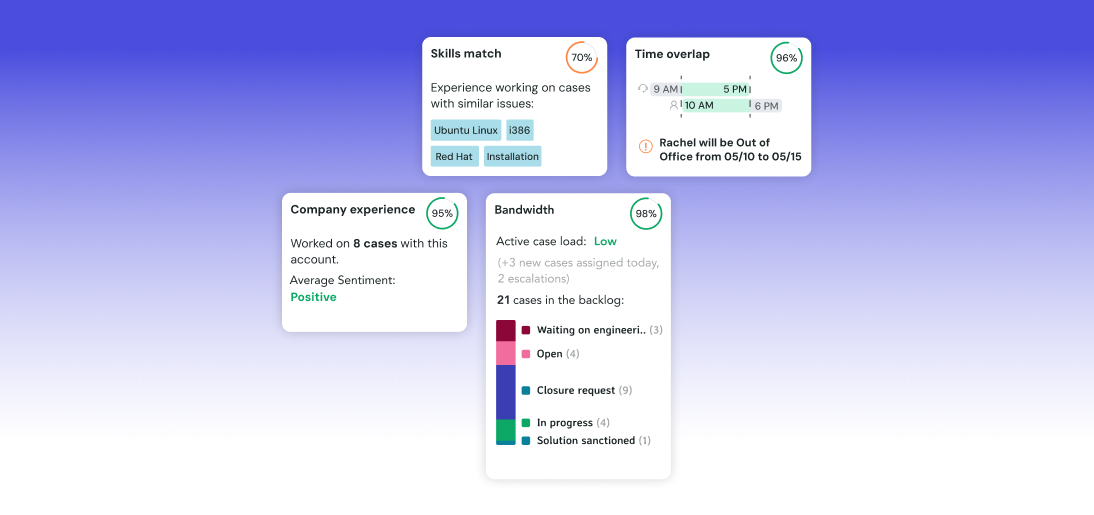
Consider what actually needs to happen when a new P1 case arrives at 2:47 AM from a strategic enterprise account in Singapore. A rules engine might check: is the agent in the APAC queue? Are they marked available? Does the case contain the keyword “critical”? But it cannot tell you: which agent in that queue has the most relevant recent experience with this account’s specific product version? Who has 40% bandwidth remaining versus 90%? Whose shift window overlaps best with the customer’s own business hours for the next 24 hours?
Rules systems fail at the combinatorial complexity of enterprise routing. The moment you add regional coverage, tiered support entitlements, specialist skill matching, real-time workload awareness, and fallback escalation logic, you have a problem that no static rule set can solve without becoming an unmaintainable tangle of exceptions.
The fundamental limitation isn’t effort — engineering teams often spend months building increasingly elaborate rule trees. The limitation is that routing quality is a function of real-time, multi-dimensional data that cannot be encoded in static rules. You need a system that can reason about five different variables simultaneously, weight them against each other, and update that reasoning every time a case is assigned, an agent goes OOO, or a customer escalates.
That is exactly the problem ICA was built to solve.
The Five-Pillar Scoring Engine
ICA’s recommendation engine computes an overall score for every candidate agent on every eligible case using a weighted average of five independently trained ML models — called “pillars.” Each pillar answers a distinct question about the agent-case fit.
t = minutes since last assignment
At t=1: penalty = 0.597 (large)
At t=90: penalty = 0.300 (moderate)
At t=180: penalty = 0.000 (reset)
— All pillar weights are configurable on request via Jira model update
— Score range: 0.0 – 1.0 (rendered as 0% – 100% in UI)
— Hard-stop availability limits applied after scoring (OOO, capacity, shifts)
The pillar weights can be customized per customer via a Jira model update request — no code changes required. For example, a customer with a highly regulated compliance team might increase the Skills weight to 0.40 and reduce Bandwidth to 0.25, prioritizing expertise over workload distribution. All customization requests go to the ML team.
Enterprise Routing Scenarios ICA Was Built For
The true test of any routing system is whether it can handle the messy, real-world edge cases that enterprise support generates at scale. Here are the scenarios that pushed SupportLogic to build ICA the way it was built.
The companies that get the most from ICA aren’t the ones with the simplest routing needs. They’re the ones that have been burned the hardest by rules-based systems — and are finally ready to stop writing exceptions to their exceptions.
SupportLogic Product EngineeringBuilding a Routing Hierarchy That Reflects Your Business
ICA’s queue model is the layer where business logic meets ML intelligence. Understanding the two queue types — and when to use each — is fundamental to a well-architected ICA deployment.
Imported directly from the CRM system. SupportLogic sees only queue names — not the internal routing logic. Each case belongs to at most one CRM queue. CRM queues are managed within the CRM.
Best for: Mirroring existing CRM structure. Adding SupportLogic agents to existing CRM routing without disrupting current CRM workflows.
SupportLogic-native queues defined by filter logic — any combination of CRM queue membership, case fields (standard or custom), accounts, reporters, virtual accounts, and virtual groups. A case can match multiple Virtual Queues simultaneously.
Best for: Cross-cutting concerns that CRM queues can’t express — e.g., “all P1 cases from enterprise accounts in EMEA using Product Module X.”
The real power of Virtual Queues is their composability. AND/OR logic (with brackets) lets support managers build arbitrarily complex filter expressions. A simple example: Priority = Critical OR Priority = Urgent AND Product Group = Security Platform. This lets a small team of security specialists handle only the most urgent security cases, while the general queue handles everything else — without any CRM reconfiguration.
Cross-queue prioritization (delivered in Q2 2025) adds a critical capability: the ability to define which groups of queues should be fully drained before ICA starts assigning from lower-priority queues.
“We need to make sure that the cases with high priority will be assigned first, and only then cases with Low priority. Today, the team is bombarded with low-priority cases, and then we have a limit that can block the cases with high priority from being assigned.”
This is solved by placing the high-priority queue group in Priority 1 of the General Queue Settings, and all other queues in Priority 2 or leaving them unprioritized (they are assigned last). The ACA service evaluates Priority 1 queue cases, assigns them, and only then moves to lower priority groups.
The same logic applies at the agent level within a queue. Each queue’s agent list can itself be stratified into Priority Buckets — so if your most skilled specialist is Priority 1 and a general pool is Priority 2, the specialist gets offered cases first every time they’re available.
Hard Limits vs. Soft Scoring: The Two Layers of ICA
One of ICA’s most important architectural decisions is the strict separation between soft scoring (the ML recommendation engine) and hard availability limits (the availability module). These two systems operate sequentially, not in competition.
ML scoring answers: among all available agents, who is best for this case? Hard limits answer: which agents are even allowed to receive a case right now? Availability limits are applied after ML scoring, meaning a perfectly scored agent is still blocked if they are OOO, outside their assignment hours, or over their capacity limit.
OOO and “outside assignment hours” are absolute blocks — no configuration can override them for standard assignment. Round Robin fallback for priority cases can only override capacity limits (hourly limit, backlog limit, max-per-day), never OOO or out-of-hours status. This distinction is critical to understand when diagnosing unassigned cases.
Beyond Keywords: How ICA Reasons About Expertise
Most routing systems treat skills as boolean flags — an agent either has “SQL” checked in their profile or they don’t. ICA treats skills as a learned, continuously updated signal derived from thousands of historical case interactions.
The Skills engine consists of three independently trained ML models. The Case Skills model analyzes the incoming case using LLM modules — not just keyword matching, but logical inference. A case that opens with “I am locked out of my account” doesn’t need to contain the phrase “password reset” for ICA to detect that this skill is relevant. The model has learned the vocabulary patterns that correlate with specific resolution skills.
The Agent Skills model scans the agent’s entire case history monthly, identifying recurring topics in cases they resolved well. TFIDF weighting prevents common skills from dominating the signal — an agent who handles hundreds of “login” cases doesn’t score unreasonably high on that skill just due to volume.
The Skill Matching model bridges the two, producing a percentage score reflecting how well this agent’s skill profile maps to this case’s requirements. The top five matching skills are surfaced in the UI for transparency.
Skills weights: A planned future enhancement will allow specific skills to carry higher weights in the recommendation formula — reflecting case complexity. A “kernel panic” or “data corruption” skill would indicate a long-resolution case, reducing how many such cases an agent receives in a given period, rather than treating it the same as a password reset.
When ICA Stops Working — and How You Know Immediately
Any system that handles case assignment automatically bears a direct responsibility for visibility. If ICA fails silently, cases stop being assigned and nobody knows why until a customer escalates. The Customer-Facing Alerting Framework (introduced Feb 2026) eliminates that blind spot.
| Severity | Trigger Condition | Aggregation Threshold | Action Required |
|---|---|---|---|
| WARNING | All agents recently assigned and declined the case | 10× within 1 hour | Review agent availability and queue rules |
| WARNING | No agents available in the queue | 10× within 1 hour | Check shifts, OOO, and capacity limits |
| WARNING | Too many matching agents — queue scope too broad | 10× within 1 hour | Narrow Virtual Queue filters |
| URGENT | CRM sync failure — auto-assignment stopped | 5× within 30 minutes | Check Fivetran / CRM Importer health |
| URGENT | ML model failures — auto-assignment stopped | 5× within 30 minutes | Contact SupportLogic ML team |
| CRITICAL | Unhandled exceptions — auto-assignment stopped | 3× within 15 minutes | Immediate escalation to DevOps/NOC |
The alert aggregation thresholds are intentional — they prevent alert fatigue from brief transient spikes while still catching persistent failures quickly. A single ML model glitch won’t fire an Urgent alert; five failures within 30 minutes will. Alerts are delivered to the customer’s configured email and to an internal SupportLogic mailing list simultaneously.
Standing Up ICA: The Right Sequence
ICA’s power is proportional to the quality of its configuration. Skipping setup steps or configuring them out of order is the most common source of poor initial recommendation quality. Here is the correct sequence.
- 01 · Validate or build the Ontology The Ontology file of keywords and skills is the foundation of the Skills pillar. Without it, all agents score 0% on skills. Work with SupportLogic SAs to either load a customer-supplied ontology or run the ML discovery tool to build one from existing case data. Requires ML Model Update Request Jira.
- 02 · Create Virtual Teams Group your agents into logical teams before creating queues or shifts. Virtual Teams can be reused across queues, shifts, OOO schedules, and priority buckets. Changing team composition later propagates everywhere automatically.
- 03 · Configure Shifts Every agent that should receive ICA recommendations must be linked to a Shift with assignment hours defined. Without this, they fall back to ML-predicted hours — less precise and less reliable. Define both Working Hours (when agents are generally active) and Assignment Hours (when they accept new cases). Set the correct timezone per shift.
- 04 · Create Queues and Link Agents Add CRM queues that mirror existing CRM routing. Build Virtual Queues for cross-cutting concerns. Link agent teams to each queue using Priority Buckets to define fallback chains from the start — it is easier to add buckets during setup than to retrofit them after launch.
- 05 · Configure Queue Rules For each queue: set the “When to use this queue?” condition (Always/Never), configure Round Robin if needed (including time windows), set Maximum cases per agent per day, choose Assignment vs. Working Hours evaluation, and configure Round Robin fallback for priority cases if needed.
- 06 · Set Cross-Queue Prioritization In General Queue Settings, define which queue groups should be processed first. This step is often skipped in initial deployments and added later when teams notice low-priority cases competing with high-priority ones for the same agents.
- 07 · Configure Agent Capacity Limits Set Active Backlog Limits and Hourly Assignment Limits for agents or teams that have known capacity constraints. New hires, part-time agents, and training cohorts especially benefit from explicit limits during their onboarding period.
- 08 · Enable Auto-Assignment and Monitor Enable auto-assignment queue by queue — start with one non-critical queue and observe the Recently Assigned tab for 24–48 hours before expanding. Watch for alert conditions (especially “No agents available” warnings) that indicate configuration gaps. Enable the Customer-Facing Alerting Framework before full rollout.
The Architecture of Routing Intelligence
ICA is not a smarter rules engine. It is a fundamentally different approach to the problem — one that treats routing as an optimization problem, not a classification problem.
Rules engines classify: this case belongs in this bucket, which routes to this team. ICA optimizes: given everything we know about this case, this customer, every available agent, and the current state of each agent’s workload, what is the best possible assignment right now?
The distinction matters because optimization handles the combinatorial complexity that classification cannot. It degrades gracefully when the ideal agent isn’t available — falling to the second-best option, then the third, rather than routing to the wrong agent or leaving the case unassigned. It learns continuously from historical outcomes rather than requiring an administrator to write a new rule every time a new edge case emerges.
The enterprise organizations that get the most from ICA are the ones that treat configuration as an ongoing practice rather than a one-time project. Revisit queue structures as your product portfolio changes. Update skill ontologies when new technologies enter your support scope. Tune capacity limits as team size and case volume evolve. The ML models improve with data over time — but the business logic layer (queues, shifts, priorities) requires human stewardship to stay current with organizational reality.
Done well, ICA becomes invisible in the best possible sense: cases simply arrive with the right person, at the right time, without anyone having to think about how they got there.
The goal isn’t to automate routing. The goal is to make routing so reliably good that your support managers can spend their time on the work that actually requires human judgment.
SupportLogic Product Engineering