
Shattering Support SILOs using SupportLogic MCP Server
Mar 6, 2026

By Sujit Sagar
In the current enterprise landscape, AI performance often drops sharply when moving from isolated tasks to cross-system workflows. Despite heavy investment, over 95% of enterprises report near-zero measurable returns because critical data remains scattered across fragmented CRMs, ERPs, and knowledge bases.
To solve these “AI silos,” Industry leaders are adopting the open source Model Context Protocol (MCP) as a universal integration layer that replaces brittle, bespoke “glue code” with a standardized protocol.
The reason most organizations fail to stop them is not a lack of effort; it is a lack of architectural intent. In this post, we’ll break down why your current CRM setup might be blinding you to risk, how to architect a “preventative” data model, and how SupportLogic uses patented AI to turn silent signals into proactive revenue protection.
We also unveil more detail about the SupportLogic MCP Server. This secure, real-time bridge connects SupportLogic intelligence directly to your preferred Agentic frameworks and MCP-compatible AI assistants including Claude Desktop, ChatGPT, Cursor, VS Code, Zed, and Gemini Code Assist.
The reason most organizations fail to stop them is not a lack of effort; it is a lack of architectural intent. In this post, we’ll break down why your current CRM setup might be blinding you to risk, how to architect a “preventative” data model, and how SupportLogic uses patented AI to turn silent signals into proactive revenue protection.
The USB-C for AI
Just as the USB-C addressed compatibility issues with mobile device charging, MCP helps address compatibility issues between AI tools. By implementing an MCP server, you can address the core hurdles of enterprise AI:
- Eliminating Fragmented Context: By providing the “missing link” of trusted, enterprise-grade context, you ensure AI doesn’t operate in a vacuum.
- Dynamic Tool Discovery: Instead of hard-coding APIs, the MCP server allows AI agents to dynamically discover available business capabilities, like sentiment analysis or escalation prediction, at runtime.
- Operational Grounding: MCP ensures that LLM outputs are “grounded” in real-time operational signals (sentiment, escalation risk, account health) rather than static, outdated data.
The Core Primitives: Beyond Just APIs
Unlike traditional REST APIs that focus on data endpoints, the SupportLogic MCP server is built around three AI-native “primitives”:
- Tools: Executable functions that allow the AI to perform actions with side effects, such as re-assigning a case owner or triggering a workflow.
- Resources: Read-only data objects, such as ticket details or knowledge base articles, that the AI references as background knowledge.
- Prompts: Pre-defined templates that guide the AI through complex workflows, ensuring consistent outcomes like professional response drafting.
State-of-the-Art Transport Layers
We utilize industry-standard transport mechanisms to ensure reliability across environments:
- STDIO: Optimized for local development and secure, “on-device” assistants like Claude Desktop.
- HTTP + SSE: The preferred method for remote connections, allowing the server to stream live updates and analysis to the AI client.
- JSON-RPC 2.0: All communication is wrapped in this lightweight protocol, providing structured error handling that allows AI agents to “self-correct” during tasks.
SupportLogic MCP Architecture
The SupportLogic MCP Server acts as a sophisticated orchestration layer between your AI clients and our enriched support data lake.
How the MCP Connectivity Works
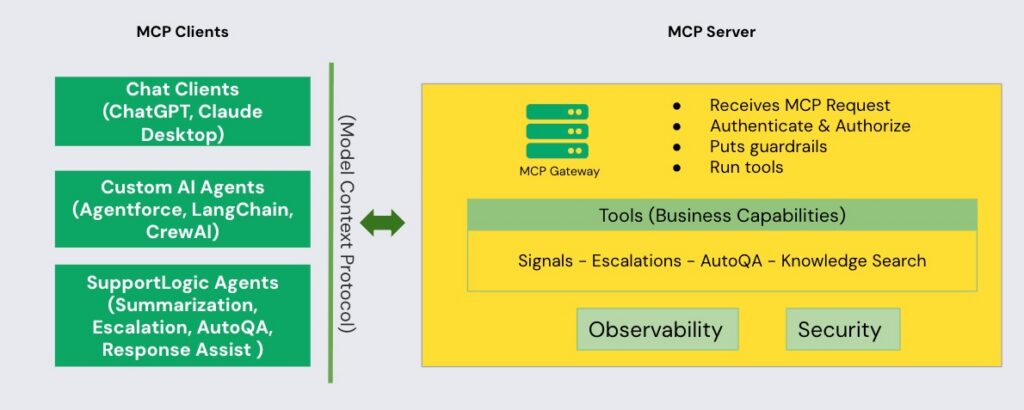
The architecture is designed for high-security environments, utilizing an MCP Gateway to manage every request. When an AI client (like Claude) requests information, the Gateway performs real-time Authentication and Authorization before executing the specific business tool.
Enterprise-Grade Observability and Security: A Zero-Trust Approach
The SupportLogic MCP Server enforces a zero-trust security model through a centralized MCP Gateway that sits between every AI client and the underlying business tools. Every request — regardless of whether it originates from Claude Desktop, a custom LangChain agent, or a SupportLogic-native workflow — is authenticated, authorized, and policy-checked at the Gateway before a single tool executes.
Granular Scoping:
- Permissions are bound to the specific intent of each tool — an agent authorized to read sentiment signals cannot trigger a case reassignment unless explicitly permitted.
- This eliminates privilege creep across complex multi-agent workflows, ensuring AI never accumulates broader access than its current task requires.
Flexible Authentication:
- Supports unique per-user API keys for developer and programmatic access, and Enterprise SSO via OAuth for identity-provider-level control.
- Access policies stay consistent with your existing governance frameworks — no parallel permission systems to manage.
Governance & Guardrails:
- Every tool invocation is logged with full context — which client made the request, which tool was called, what data was accessed, and what was returned.
- When something needs to be investigated or rolled back, the answer is in the audit trail — not buried in fragmented, client-side logs.
Real-Time Monitoring:
- The MCP Gateway continuously tracks tool call frequency and detects anomalous usage patterns across all connected clients — alerting teams when agent behavior deviates from expected baselines.
- If a workflow fires an unusual volume of escalation triggers or a client attempts out-of-scope data access, monitoring surfaces it in real time — before it becomes a problem.
Your SupportLogic Intelligence, Reimagined
Our architecture transforms your historical and operational support data into ready-to-use intelligent tools.
Signals & Insights
- Extract Signals (extract_signals): Analyzes text or structured case data to detect customer sentiment, urgency, and emotional tone in real-time.
- Escalation Management (list_of_escalations): Returns recently escalated cases or those likely to escalate based on early warning patterns.
Quality & Case Intelligence
- AutoQA (auto_qa): Automatically evaluates case quality, Customer Effort Scores (CES), and agent performance.
- Case & Account Details: Retrieves computed health scores and detailed analysis for specific cases (case_details) or broad account-level monitoring (account_details).
Knowledge Search
- Contextual Clarification (corpus_clarification): Resolves ambiguous questions before searching to improve accuracy.
- Smart Search & Answer: Perform knowledge searches (query_search) and retrieve concise, contextual answers (get_answer) for complex AI workflows.
Getting Started Guide: Connecting to MCP/AI clients
To help your users and developers integrate the SupportLogic MCP Server into their preferred environments, here is a consolidated guide for the most popular AI assistants and editors.
Universal Setup Requirements
Before connecting to any client, you must retrieve your unique credentials from the SupportLogic platform:
- Retrieve Credentials: Log in to SupportLogic and navigate to Settings → MCP.
- Copy Details: You will need your Remote MCP Server URL (https://mcp.supportlogic.io/mcp) and your personal Client ID.
Connecting to AI Chat Clients
Claude Desktop (Pro Plan Required)
Claude Desktop supports remote MCP servers via its configuration file or a built-in connector UI.
- Method 1 (UI): Go to Settings → Connectors → Add Custom Connector. Enter “SupportLogic” as the name and paste your URL and Client ID.
- Method 2 (Config File): Add the following to your claude_desktop_config.json:
{
"mcpServers": {
    "supportlogic": {
      "type": "http",
      "url": "https://mcp.supportlogic.io/mcp"
    }
}
}
ChatGPT Plus/Enterprise
OpenAI supports remote MCP servers (SSE/Streamable HTTP) through its Developer Mode.
- Enable Developer Mode: Go to Settings → Apps & Connectors → Advanced Settings and toggle Developer Mode to ON.
- Add Connector: Click the Create button in the Connectors settings.
- Configure: Set the Connector URL to your SupportLogic MCP URL and use your Client ID for authentication.
Connecting to AI-Powered Editors
VS Code (with GitHub Copilot)
VS Code allows you to add MCP servers either globally or specifically for a project workspace.
- Open Command Palette: Press Ctrl+Shift+P (Windows) or Cmd+Shift+P (Mac) and search for “MCP: Add Server”.
- Choose Transport: Select HTTP Streaming (or SSE).
- Enter URL: Paste your SupportLogic MCP URL.
- Activate Agent Mode: Ensure GitHub Copilot is in Agent Mode to utilize the tools.
Cursor
Cursor provides a dedicated interface for managing MCP servers in its settings.
- Navigate to Settings: Use Ctrl+Shift+J (Windows) or Cmd+Shift+J (Mac) and select MCP.
- Add New Server: Click “Add new global MCP server”.
- Configure: Set the type to “url” (Streamable HTTP) and paste your SupportLogic URL
⚡ One-Command Installation (add-mcp)
For developers who want to skip manual configuration, you can use the add-mcp CLI to install the SupportLogic server across multiple editors (Claude, Cursor, VS Code) simultaneously.
Run once:
npx add-mcp https://mcp.supportlogic.io/mcp
Real-World Use Cases: SupportLogic MCP in Action
See how agentic frameworks and MCP-compatible AI clients autonomously orchestrate SupportLogic intelligence to transform support workflows — without human intervention at every step.
1. Executive Escalation Briefing
Enterprise support leaders know the feeling: a VP is pulled into an urgent customer call with 30 minutes notice and zero context. Traditionally, someone scrambles to pull case history, ping the original agent, and stitch together a coherent story under pressure — often walking into the call underprepared.
With SupportLogic MCP connected to an agentic framework, this entire preparation workflow becomes autonomous. The moment a calendar event is flagged as an escalation call, a Slack-connected AI agent springs into action without any manual trigger. It calls case_details to retrieve the full case timeline, resolution attempts, and agent interactions. In parallel, it calls account_details to pull the account’s health score, historical sentiment trend, and any prior escalation patterns. The agent then chains these outputs into a structured briefing prompt — producing a crisp executive summary covering the root cause, the customer’s emotional arc across interactions, what has been tried, and recommended talking points for the call.
The finished brief lands in the exec’s Slack thread before they’ve even opened their laptop. MCP’s dynamic tool discovery means this same workflow can extend to push the briefing into Salesforce as a case note or into a Google Doc — without any hardcoded integration work.
| → No scrambling, no gaps, no walking in blind → Full context delivered autonomously → One agentic workflow chains case_details, account_details, and Prompts |
2. Backlog Triage After a Product Outage
A platform incident hits at 2am. By morning, the support queue has 600 new tickets — a mix of critical enterprise customers who are blocked, mid-market accounts venting frustration, and long-tail users asking status questions. Without intelligent triage, the queue gets worked in the order tickets arrived, meaning a Fortune 500 customer blocked on production could sit behind a password reset request.
With SupportLogic MCP orchestrated through an agentic framework like LangGraph or n8n, a mass triage workflow fires automatically when the incident is declared. extract_signals runs across the entire backlog in parallel — analyzing sentiment, urgency, and customer tier across hundreds of tickets simultaneously. The agent clusters tickets into priority buckets: production-blocked enterprise accounts, high-frustration mid-market, and informational queries. It then re-prioritizes the cases queue accordingly and routes the most critical cases directly to senior agents, bypassing the standard FIFO queue entirely.
Post-incident, the same workflow generates a signal report showing which account segments were hit hardest — feeding directly into the incident retrospective.
| → Hundreds of tickets triaged without too much manual involvement → Highest-pain customers surfaced and routed automatically → Incident signal report generated with minimal manual effort |
3. 100% QA Coverage Without Headcount
Traditional QA in support operations is a sampling problem. Supervisors manually review 5–10% of closed tickets, which means the vast majority of customer interactions — and agent coaching opportunities — go completely unexamined. Feedback is delayed, inconsistent, and often arrives weeks after the interaction when it’s no longer relevant to the agent.
With SupportLogic MCP integrated into an agentic workflow, QA coverage becomes total and continuous. Every night, a scheduled agent triggers auto_qa across all tickets resolved in the past 24 hours — evaluating each one for response quality, Customer Effort Score, adherence to communication guidelines, and compliance with escalation protocols. The agent aggregates scores, automatically identifies outliers, and generates specific, constructive coaching notes for each flagged interaction.
Supervisors receive a daily digest of only the cases that need human attention. Agents get near-real-time feedback instead of waiting for a monthly review cycle — dramatically compressing the learning loop. Over time, consistent auto_qa signals surface systemic training gaps at the team level, giving support leaders data to build targeted enablement programs.
| → 100% ticket coverage — not 5–10% sampling → Coaching notes delivered same day, not next month → Zero additional headcount required |
4. SLA Breach Prevention on High-Value Accounts
SLA breaches on enterprise accounts are rarely sudden — they’re the result of cases that went quiet, got stuck in handoffs, or fell through the cracks during a busy shift. By the time a breach is flagged, the damage to the customer relationship is already done.
SupportLogic MCP running inside a persistent monitoring agent changes the intervention point entirely. The agent polls all open high-priority cases every 15 minutes, continuously checking time-to-breach windows against current activity levels. When a platinum-tier customer’s case crosses a configurable inactivity threshold — say, 2 hours from SLA breach with no agent response — the MCP tool chain fires autonomously. It calls case_details to assemble full context, re-assigns the case to an available senior agent, and simultaneously posts an alert to the on-call lead’s Slack with the case summary, customer sentiment score, and breach countdown attached.
Over time, patterns in near-breach cases — recurring account segments, time-of-day gaps, specific issue categories — surface through account_details trend data, giving operations leaders the insight to fix structural causes rather than just chasing individual fires.
| → Always-on monitoring — no human queue watching required → Auto-reassignment + Slack alert fired as a single tool chain → Structural breach patterns surfaced for ops leaders |
5. Cross-Account Trend Detection
One of the most underutilized assets in any support organization is the collective signal buried across thousands of open cases. A new firmware bug, a confusing onboarding step, a billing edge case — these issues often appear as isolated complaints before they become a visible wave. By the time product or engineering hears about it through formal channels, dozens of customers are already frustrated.
SupportLogic MCP running as a nightly agentic workflow closes this gap. Every night, extract_signals processes all cases created or updated in the past 24 hours across every account. The agent clusters emerging themes by complaint type, product area, and account tier — identifying patterns no individual agent would see from within their own queue. When a cluster crosses a significance threshold, the workflow automatically drafts a structured signal report: which accounts are affected, the sentiment trajectory, case volume trend, and a synthesized description of the root complaint.
Because MCP’s dynamic tool discovery allows the agent to route outputs to any connected system without hardcoded integrations, this report lands directly in the product team’s Jira as a tagged issue, in the engineering Slack channel as a structured alert, and in Salesforce as a case note linked to all affected accounts — simultaneously.
| → Support data becomes a real-time product intelligence feed → Emerging complaint clusters caught before they become escalation waves → Signal reports can be auto-routed to Jira, Slack, and Salesforce simultaneously |
Conclusion: The Future of Agentic Support
The SupportLogic MCP Server represents a fundamental shift in how support organizations interact with AI. By moving away from static integrations and toward a standardized, context-rich protocol, we are enabling AI agents to reason, act, and provide value with unprecedented precision.
Whether you are looking to automate executive briefings, achieve 100% QA coverage, or proactively manage SLAs, the MCP server provides the secure, scalable foundation needed to turn your support data into a competitive advantage. The gap between data and action has been bridged—it’s time to start building.
Ready to integrate SupportLogic intelligence into your application? Please email mcp@supportlogic.io to gain access to the SupportLogic MCP server.